Is something broken? Let’s fix it! That’s what I’m here for. At this time, I’m available for ad-hoc support requests on a case-by-case basis.
I offer remote support utilizing something called a Remote Monitoring & Management, or “RMM” tool. This allows me to connect to your computer to provide assistance in a remote fashion. This installs a small program on your computer which will register with a centralized control server. The installation instructions are below as follows:
- Click on the download link in the menu to the side (or bottom). This will download the file required.
- You may see a “This file may be malicious”. That’s OK, it’s not. Your computer warns you to help prevent you from doing something you don’t want to do (but in this case, you do!). Depending on the browser, you will likely click “Download suspicious file”. Trust me, it’s OK.
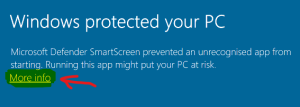
- If a prompt comes up, click on “More Info”
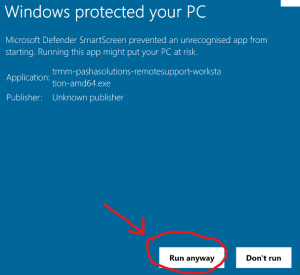
- You will likely see “Run Anyways”. Click This.
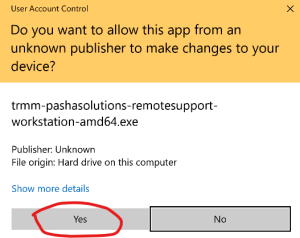
- If another prompt appears, click “Yes”.
- A black screen should appear and it will begin installing the agent. This should take anywhere from 1-3 minutes to complete. Once done, the black screen should disappear.
- You’re ready to be saved.
Remote Support Tool
If instructed by one of our super smart engineers, click the link below to download our support tool.

*Pasha Solutions provides no guarantees, warranties, or otherwise for the software above. Please use at your own discretion.